

Acronis True Image Overview
Acronis True Image (formerly A cronis Cyber Protect Home Office) is a comprehensive personal cyber protection solution – integrating advanced cybersecurity capabilities with our best-of-breed backup to guard users’ personal devices and backups from today’s cyberthreats.
Key Features of Acronis True Image
- Backup and Recovery
Mirror imaging. Disk cloning. All-in-one recovery drives. It’s easy to ensure your data is available for recovery, no matter what happens. - Anywhere Access
Retrieve any file from your cloud backup, wherever you are, on any device. Manage backups remotely. Enjoy secure file sync and share. - Innovative Protections
The only personal backup solution that uses AI to stop ransomware and cryptojacking in real time. Offers blockchain data notarization. - Enhanced Vision
How we access and use data is constantly changing, as are the threats to that data. Your protection must evolve too. With 100+ enhancements and new features, A cronis True Image 2020 keeps you current. - Automated Dual Protection
Back up locally while simultaneously replicating it in the cloud so you’ve always got a secure off-site copy for recovery. - Tray Notification Center
Messages pushed to your desktop tray enable you to monitor the status of backups so you can quickly respond to any issues. - Custom Power Management
Avoid draining your battery by efficiently managing laptop backups. Set a minimum power level or block backups on battery power. - Back Up on Select Wi-Fi
Where you back up is your choice. Now you can easily avoid the metered connections and public networks that put data at risk. - Improved Cloud Restores
Enjoy faster performance and a more intuitive experience. Enhanced for even easier navigatation. - Efficient, All-in-one Protection
Using multiple solutions to protect your data? Then you’re paying more for a patchwork that creates gaps in your defense. A cronis True Image 2020 delivers the power of integration, with data protection, cybersecurity, and management features you control from a single intuitive dashboard. - Versatile
Back up what you want, how you want with tools like mirror imaging, file/folder-level backups, active disk cloning, cloud-to-cloud Office 365 backups, event-based scheduling, non-stop backups, and automatic replication of local backups in the cloud. - Flexible
Control where you store your data, whether it’s locally on an external hard drive, network folder or NAS device, off-site in the cloud, or a combination to ensure total protection. Approve specific Wi-Fi networks to avoid potential problems. - Visual
Know everything about your backup at a glance. Monitor the status of backups with push notifications to your desktop tray. See file sizes, backup speeds, and color-coded displays of the type of data stored with our visual dashboard. - Compatible
Safeguard your data regardless of where it lives with a solution that supports the latest versions of Windows, Mac, iOS and Android devices, as well as virtual machines. Our integrated anti-malware defense is 100% compatible with other anti-virus software.
Acronis True Image System Requirements
Below are the minimum system requirements for running the A cronis True Image
| Processor: | Intel CORE 2 Duo (2 GHz) or equivalent processor that supports SSE instructions.. |
| RAM: | 4 GB available memory. |
| Windows: | 11, 10, 8.1/8, 7. |
| Space: | 2 GB available space. |
Acronis True Image Changelog
Below is the list of changes made to the current version of A cronis True Image.
Acronis True Image Screenshots
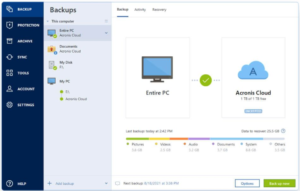
How to use Acronis True Image?
Follow the below instructions to activate your version of A cronis True Image.
- Burn the ISO file to a usb drive
- Restart your computer and boot from the created usb drive
- That’s it, Enjoy the app!
FAQS
Is Acronis True Image free?
Acronis True Image is not completely free software. It is a paid backup and recovery solution that requires a license for full access to all features. Users can sometimes access a trial version, which allows them to test the core functions for a limited period. The trial version provides basic backup and restore capabilities but does not include all advanced features such as ransomware protection and cloud backup.
The paid version of Ac ronis True Image offers ongoing updates and support, ensuring users have access to the latest backup technology. While the software is not free, its one time purchase or subscription model provides comprehensive tools for protecting data. Users seeking a reliable and secure backup solution often consider A cronis True Image for both personal and professional use.
What is Acronis True Image used for?
A cronis True Image is used for creating full system backups, restoring files, and protecting data against loss. The software allows users to back up entire hard drives, specific files, or folders. It is commonly used to prevent data loss due to hardware failure, accidental deletion, malware attacks, or system crashes.
A cronis True Image also enables users to create bootable backups, allowing complete system restoration even if the operating system fails to start. This makes it a powerful tool for maintaining system integrity and minimizing downtime. Users can schedule automatic backups to ensure continuous protection without manual intervention.
In addition to backup and recovery, A cronis True Image provides options for disk cloning and secure file deletion. These features make it suitable for migrating data to new drives or permanently erasing sensitive information. Overall, A cronis True Image is used to safeguard digital data and maintain system reliability.
How to download Acronis?
To download Ac ronis True Image, users need to visit the official A cronis website or an authorized distributor. Once on the site, they can select the appropriate version of A cronis True Image for their operating system and choose between a trial or full license. After selecting the desired option, users can follow the on screen instructions to begin the download.
The download process typically involves saving an installer file to the computer and running it to start installation. During installation, users may be prompted to enter a license key if they purchased the full version. The setup wizard guides users through configuration, allowing them to choose backup locations and schedule settings.
Once installed, A cronis True Image is ready to use for backup and recovery tasks. The software provides a user friendly interface that makes it easy to manage backup plans and monitor system protection. Downloading and installing A cronis True Image is straightforward and designed for both beginners and advanced users.
What is Acronis on my PC?
A cronis on your PC refers to the presence of Acronis True Image software installed on your system. It indicates that backup and recovery tools are available for protecting your files and system data. The software may run in the background to perform scheduled backups or to monitor system health.
Having A cronis on your PC allows you to create full system images, restore lost files, and manage backup versions. It can also provide notifications for backup status and alerts in case of errors. A cronis on your PC ensures that data is continuously protected and recovery options are accessible when needed.
The presence of A cronis on a computer does not affect daily use unless the software is actively performing a backup or update. It functions as a security and maintenance tool, helping maintain data integrity and system stability. Users can access A cronis at any time to manage backups and perform restoration tasks.
Acronis True Image Details
Below are the details about Ac ronis True Image.
| App Size: | 808.4 MB |
| Setup Status: | Untouched |
Acronis True Image Download Links













