
AIArty Image Matting Overview
The State-of-the-Art AI-based image matting software for your AIPC, delivering precise background removal, advanced alpha matting for detailed hair, fur, and transparent objects, and seamless foreground-background blending.
Key Features of AIArty Image Matting
- Optimized for Semi-transparent Object Matting
Utilize deep convolutional layers to capture complex features in images like wedding dresses, lace, tulle, glass, and water droplets. Expertly preserve translucent properties and optimize edge details, ensuring more natural blend into the new background. - Isolate Low-light/Contrast Images
Improve matting accuracy even in low light scenes, reduce noise, and preserve fine details. Clearly seperate foreground from background. No more blurred edges or incomplete masks. - Separate Intricate Texture
Maintain precise texture integrity. Separate fabrics, net, necklaces, flower, and foliage with extreme clarity. Every subtle boundary is retained. - Remove Complex Backgrounds
Enhance visual perception to isolate subjects from any cluttered or busy backgrounds, be it light and shadow, crowds, architecture, or complex patterns. - Batch Replace Backgrounds for Product Images
Smart object recognition & batch background replacement. Identify and process up to 3000 product photos, replacing backgrounds all at once. - High-Precision Alpha Matting
Go a step further with dynamic transparency control and edge optimization even in complex edge cases. This ensures excellent detail preservation and makes background integration seamless. - Versatile Background Effects
Replace backgrounds with transparency, solid colors, custom effects like blur, or other images. Highlight the subject and create appealing compositions for e-commerce, personal projects, and more.
What Is Aiarty Image Matting?
Aiarty Image Matting is an advanced AI-powered image matting and background removal software designed to accurately separate subjects from their backgrounds. Unlike basic background remover tools, Aiarty focuses on professional-grade alpha matting, allowing it to handle complex edges such as hair, fur, transparent objects, glass, lace, and shadows.
The software uses deep learning algorithms to generate clean, smooth cutouts while preserving fine details. It is optimized for desktop use and supports offline processing, making it suitable for users who require privacy, speed, and large-scale image processing without relying on cloud services.
Aiarty Image Matting is widely used in e-commerce, photography, graphic design, marketing, and content creation where image quality and consistency are critical.
Benefits of Using Aiarty Image Matting
High-Precision AI Matting
Aiarty delivers accurate subject extraction with smooth edge transitions, even in difficult images involving hair strands, semi-transparent materials, or low-contrast backgrounds.
Batch Processing at Scale
The software supports large-volume batch processing, allowing users to remove or replace backgrounds from thousands of images at once, saving significant time and effort.
Offline Image Processing
All image processing happens locally on the user’s device, ensuring data privacy and eliminating the need for internet access or cloud uploads.
Professional Editing Controls
Aiarty includes tools for manual refinement such as brush adjustments, edge correction, and transparency control, giving users more flexibility than one-click background removers.
High-Resolution Output
Images can be exported in high resolution, making them suitable for professional printing, online stores, advertising materials, and digital design projects.
Workflow Efficiency
By automating complex matting tasks, Aiarty reduces reliance on manual editing in traditional software and accelerates overall production workflows.
Why Use Aiarty Image Matting?
Ideal for E-Commerce Sellers
Online sellers can create clean, consistent product images with white or custom backgrounds, improving visual appeal and conversion rates.
Valuable for Photographers and Designers
Professionals can quickly isolate subjects and build composites without spending hours on manual masking.
Useful for Content Creators and Marketers
Aiarty helps produce polished visuals for websites, social media, thumbnails, ads, and branding materials with minimal effort.
Reliable for Bulk Image Editing
Businesses and agencies handling large image libraries benefit from automated batch processing and consistent results.
Better Than Basic Background Removal Tools
Aiarty goes beyond simple cutouts by offering detailed matting, edge refinement, and transparency handling that standard tools often fail to deliver.
Pros and Cons of Aiarty Image Matting
Pros
-
Advanced AI image matting with high accuracy
-
Excellent handling of hair, fur, glass, and transparent objects
-
Supports large batch processing for high-volume workflows
-
Offline processing ensures privacy and security
-
High-quality, professional output suitable for commercial use
-
Includes manual refinement tools for precision control
Cons
-
Advanced features may require a learning curve for beginners
-
Full functionality is available only in the paid version
-
Performance depends on system hardware, especially for large batches
-
Not a full photo editor, mainly focused on matting and background tasks
AIArty Image Matting System Requirements
Below are the minimum system requirements for running the AIArty Image Matting
| RAM: | 2 GB available memory. |
| OS: | macOS 11.0 or later. |
| Space: | 400 MB available space. |
AIArty Image Matting Changelog
Below is the list of changes made to the current version of AIArty Image Matting.
- Official site does not provide any info about changes in this version.
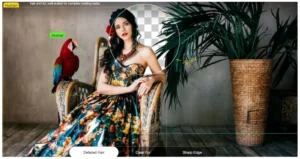
AIArty Image Matting Screenshots
How to use AIArty Image Matting?
Follow the below instructions to activate your version of AIArty Image Matting.
- Mount the dmg file
- Run the installer and install app normally
- That’s it, Enjoy!
AIArty Image Matting Details
Below are the details about AIArty Image Matting.
| App Size: | 189.5 MB |
| Setup Status: | Pre-Activated |














