

EngiCalc – Engineer Calculator Overview
EngiCalc is a comprehensive tool designed for engineers, scientists, and students, offering an extensive suite of calculators, converters, and reference materials to meet all your technical needs. Whether you’re working on electrical, mechanical, civil, or chemical engineering projects, EngiCalc is here to assist you with precision and efficiency.
Key Features of EngiCalc – Engineer Calculator
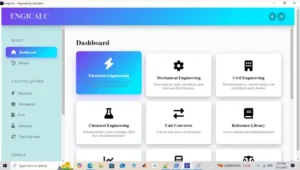
- Electrical Engineering
Calculate circuit parameters, power factors, filter designs, and more with tools like Ohm’s Law Calculator, Power Factor Calculator, RLC Circuit Analyzer, Voltage Divider, and Current Divider. - Mechanical Engineering
Perform stress analysis, beam calculations, gear ratio determinations, fluid dynamics, and energy calculations with tools such as Beam Deflection Calculator, Stress Analysis, Gear Ratio Calculator, Kinetic and Potential Energy Calculators. - Civil Engineering
Conduct structural analysis, concrete design, load calculations, hydraulic assessments, area and volume calculations, and slope analysis. Tools include Structural Analysis Calculator, Concrete Design Calculator, Load Calculation, Hydraulics Calculator, Area Calculation, Volume Calculation, and Slope Calculation. - Chemical Engineering
Evaluate reaction kinetics, heat exchanger efficiency, fluid flow, thermodynamics, molarity, dilution, and density. Tools include Reaction Kinetics Calculator, Heat Exchanger Calculator, Fluid Flow Calculator, Thermodynamics Calculator, Molarity and Dilution Calculators, and Density Calculator. - Unit Converter
Convert units across various disciplines with ease, including voltage, resistance, current, power, frequency, capacitance, inductance, length, temperature, pressure, energy, time, velocity, and flow rate. - Graph Plotter
Plot equations and analyze functions with customizable options for chart types, colors, grid display, and more. Ideal for visualizing mathematical functions and data trends. - Reference Library
Access a comprehensive library of material properties and scientific constants. Find details on materials like steel, aluminum, copper, and more, along with constants such as elastic modulus, thermal conductivity, density, and specific heat. - Data Logger
Track and analyze measurements with tools for logging data points, calculating mean, standard deviation, median, mode, variance, skewness, and kurtosis. - Cost & Efficiency Estimator
Estimate project costs and energy efficiency with inputs for material costs, labor costs, equipment costs, operational costs, energy consumption data, and more. Outputs include total project cost, monthly cost, energy costs, energy efficiency score, and carbon footprint. - Safety Factor Calculator
Calculate reliability and safety factors for different components with inputs for material properties, dimensions, applied loads, stress and strain data, and operating conditions. Outputs include safety factor, reliability score, failure mode analysis, and safety recommendations.
EngiCalc – Engineer Calculator System Requirements
Below are the minimum system requirements for running the EngiCalc – Engineer Calculator
| Processor: | Intel Pentium 4 or later. |
| RAM: | 2 GB available memory. |
| Windows: | 11, 10, 8.1/8, 7. |
| Space: | 500 MB available space. |
EngiCalc – Engineer Calculator Changelog
Below is the list of changes made to the current version of EngiCalc – Engineer Calculator.
- Official site does not provide any info about changes in this version.
EngiCalc – Engineer Calculator Screenshots
How to use EngiCalc – Engineer Calculator?
Follow the below instructions to activate your version of EngiCalc – Engineer Calculator.
- Unpack setup from archive and disable internet
- Install using given installer (preactivated)
- That’s it, Enjoy!
FAQS
Which calculator is best for engineers?
The calculator considered best for engineers depends on the type of engineering and the level of complexity required. Engineers generally need calculators that can handle advanced mathematical functions such as calculus, complex numbers, matrices, vectors, and statistical analysis. A strong engineering calculator must also support scientific notation and provide accurate results for technical problem solving.
For most engineering disciplines, a scientific or graphing calculator is preferred over a basic calculator. These calculators allow engineers to perform multi step calculations efficiently during exams, coursework, and professional tasks. Reliability, speed, and clarity of display are also important factors when choosing the best calculator for engineers.
Many engineers prefer calculators that are approved for academic and professional use, ensuring they comply with exam regulations. Ease of use and familiarity also play a major role, as engineers often rely on their calculator daily. The best calculator for engineers is one that balances advanced functionality with practical usability.
Which calculator is best for engineering?
The best calculator for engineering is typically one that supports higher level mathematics and engineering specific functions. Graphing calculators are widely used because they can visualize equations and analyze functions effectively. They are especially helpful in fields such as electrical, mechanical, and civil engineering.
Engineering calculators should include built in support for trigonometry, logarithms, derivatives, and integrals. Many engineering students and professionals choose calculators that allow symbolic representation and numerical approximation. These capabilities help solve complex equations quickly and accurately.
Another important aspect is durability and long term use. Engineering calculators are often used throughout several years of study and into professional practice. The best calculator for engineering is one that remains relevant across multiple subjects and applications, making it a dependable tool for problem solving.
Is the TI-84 good for engineering?
The TI-84 is widely used in engineering education and is considered a reliable calculator for many engineering tasks. It is a graphing calculator that supports algebra, trigonometry, statistics, and basic calculus functions. These features make the TI-84 suitable for introductory and intermediate engineering courses.
The TI-84 is especially popular among students because it is commonly approved for exams and standardized testing. Its graphing capabilities allow users to visualize equations and analyze data effectively. For engineering students learning mathematical concepts, the TI-84 provides a strong foundation.
However, the TI-84 does have limitations for advanced engineering applications. It may not support symbolic calculus or advanced matrix operations at the level required for higher level engineering work. Despite this, the TI-84 remains a good choice for engineering students who need a dependable and widely accepted calculator.
How do I say “I love you” in a calculator?
Saying “I love you” on a calculator is a playful trick that uses numbers and letters. The phrase is typically displayed by typing numbers into the calculator and then turning it upside down. When inverted, the numbers resemble letters that spell out a message.
To say “I love you,” a common sequence entered into the calculator is 0.7734. When the calculator is flipped upside down, the numbers resemble the letters hELL0 or I love u depending on interpretation. Some variations use longer number combinations to create clearer messages.
This calculator message trick has been popular for decades, especially among students. While it has no functional purpose in engineering, it remains a fun and creative way to use a calculator. Even serious tools like engineering calculators can be used for lighthearted expressions such as this.
EngiCalc – Engineer Calculator Details
Below are the details about EngiCalc – Engineer Calculator.
| App Size: | 145.8 MB |
| Setup Status: | Untouched |













