

What Is Fing – Network Tools APK
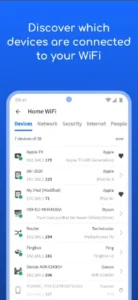
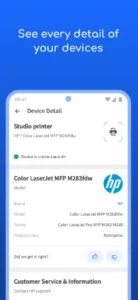
Fing – Network Tools APK is a network scanning and diagnostic tool that allows users to analyze Wi-Fi and LAN networks directly from an Android device. The app scans your network to show all connected devices, identifies unknown users, and provides technical details such as IP addresses, MAC addresses, device manufacturers, and connection status.
It is commonly used for home network monitoring, office network management, troubleshooting internet issues, and improving Wi-Fi security.
Key Features of Fing – Network Tools APK
Network device discovery
The app scans your Wi-Fi or LAN network and displays all connected devices, including phones, computers, smart TVs, cameras, routers, and IoT devices.
Wi-Fi network analysis
Fing analyzes nearby Wi-Fi networks, showing signal strength, channel usage, encryption type, and network congestion to help optimize performance.
Intruder detection
Detects unknown or unauthorized devices connected to your network and notifies you when a new device joins.
Internet speed test
Measures download speed, upload speed, and latency to evaluate the quality and stability of your internet connection.
Network diagnostic tools
Includes essential tools such as ping, traceroute, DNS lookup, and port scanning to identify connectivity and routing issues.
Device identification
Uses advanced fingerprinting to accurately identify device types and manufacturers connected to the network.
Router and ISP information
Displays basic router details and internet service provider information for better network awareness.
User-friendly interface
Clean and intuitive layout makes complex network data easy to understand for non-technical users.
Benefits of Using Fing – Network Tools APK
Fing offers practical benefits for both personal and professional use:
-
Complete visibility of all devices connected to your network
-
Improved network security through intruder detection
-
Faster troubleshooting of internet and Wi-Fi issues
-
Better Wi-Fi optimization using channel and signal analysis
-
Portable network management without extra hardware
-
Suitable for beginners and advanced users
-
Reliable performance with minimal system resource usage
Why Use Fing – Network Tools APK
Many routers provide limited information through their default interfaces. Fing fills this gap by offering detailed insights and professional-grade tools in a mobile-friendly format.
Reasons to use Fing include monitoring who is using your Wi-Fi, detecting unauthorized access, diagnosing slow internet speeds, managing smart home devices, and gaining a better understanding of your network environment. It is especially useful for users who want control without complex configurations.
Pros and Cons of Fing – Network Tools APK
| Pros | Cons |
|---|---|
| Accurate detection of connected devices | Some advanced features require premium |
| Easy-to-use interface | Cannot block devices directly |
| Intruder and security awareness | Continuous monitoring needs subscription |
| Includes speed test and diagnostics | Requires location permission for Wi-Fi scans |
| Works without root access | Limited router configuration control |
| Suitable for home and office use | Internet required for some tools |
App Information
App Name: Fing – Network Tools
Category: Tools / Network Utilities
Developer: Fing Limited
File Type: APK
App Size: Approximately 15–25 MB
Android Version Required: Android 6.0 or higher
Root Required: No
License: Free with optional premium features
System Requirements
To ensure smooth operation, your device should meet the following requirements:
Operating system: Android 6.0 or above
RAM: Minimum 1 GB (2 GB recommended)
Storage: At least 30 MB free space
Network: Wi-Fi or LAN connection
Permissions: Location access (required by Android for Wi-Fi scanning), network access
What’s New in the Latest Version
Recent versions of Fing – Network Tools APK typically include:
-
Improved accuracy in device identification
-
Faster and more stable network scanning
-
Bug fixes and performance enhancements
-
Better recognition of smart home and IoT devices
-
UI refinements for easier navigation
-
Improved compatibility with newer Android versions
How to Install Fing – Network Tools APK
Download the APK file from a trusted source.
Enable “Install unknown apps” from your Android security settings.
Open the APK file and tap Install.
Launch the app and grant the required permissions.
Start scanning and monitoring your network.
Legal and Ethical Use Notice
Fing should only be used on networks you own or have permission to analyze. Scanning networks without authorization may violate privacy laws or local regulations. Always use the app responsibly.
Final Verdict
Fing – Network Tools APK is a reliable and powerful network analysis solution for Android users who want better visibility, security, and performance from their Wi-Fi or LAN networks. With its comprehensive scanning capabilities, intuitive interface, and professional diagnostic tools, Fing stands out as one of the best network utility apps available.
Fing – Network Tools Apk for Android: Everything You Need to Know
Is Nero burning free?
Is Nero Burning ROM compatible with Windows 11?
What is the best free CD burning software?
Is Nero Burning ROM easy to use?
Is upgrading to the latest version free?














