

Topaz Video AI Overview
Stunning video enlargements with groundbreaking AI technology. Trained on thousands of videos and combining information from multiple input video frames, Topaz Video AI will enlarge and enhance your footage up to 8K resolution with true details and motion consistency. Using intelligent AI technology, Video Enhance AI is the most powerful video upscaling software ever released.
Key Features of Topaz Video AI
- Incredible Video Upscaling for Professional Filmmakers
Traditional video upscaling simply stretches resolution, degrading quality and destroying details. There has never been a way to perfectly recreate high-resolution video from low-resolution footage… Until now. We developed Video Enhance AI using groundbreaking machine learning technology to upscale video footage intelligently, for crisp details and motion consistency all the way up to 8K resolution. Some call it “magic”, but we call it the power of AI. - Enhancing Footage up to 8K
Video Enhance AI is the perfect way to take good footage and make it great. Have you ever wanted your footage to look sharper with more detail? Take HD footage all the way up to 8K for use in high-quality projects.- DVD Content
- DSLR Footage
- Game Footage
- HD Stock Footage
- Upscaling Low-Res Footage
With Video Enhance AI, you can take your footage from SD to HD with an incredible increase in quality. It’s perfect for older footage that you want to repurpose for modern use.- Commercials
- Music Videos
- Movie Content
- Youtube Videos
- Quality
Until now, no deep-learning based approach existed for video enlargement as a commercial product. Video Enhance AI is the only product that uses machine learning to extrapolate detail from your footage for a realistic look. The quality of output from Video Enhance AI is simply better than any other product available. - Training
Video Enhance AI was trained using a neural network that analyzes thousands of video pairs to learn how details usually get lost. Unlike Gigapixel AI for photos, Video Enhance AI is able to extrapolate more detail for an even more realistic look given the amount of information available in a single video clip. - Easy to Use
With just a few clicks of a button, your video footage will start rendering to create beautiful high-resolution quality footage. There are no complicated processes or confusing tools – just a few simple steps and your footage is ready to go.
Topaz Video AI System Requirements
Below are the minimum system requirements for running the Topaz Video AI
| Processor: | Intel 2nd Generation i5 (released 2011) and later, with AVX or AMD CPU (released 2011) and later, with AVX. |
| RAM: | 12 GB available memory. |
| Windows(64-bit): | 11, 10. |
| Space: | 4 GB available space. |
Topaz Video AI Changelog
Below is the list of changes made to the current version of Topaz Video AI.
Topaz Video AI Screenshots
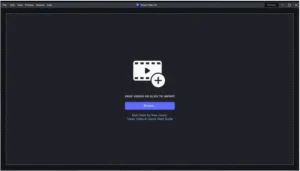
How to use Topaz Video AI?
Follow the below instructions to activate your version of Topaz Video AI.
- Unpack setup from archive and disable internet
- Install using given installer (preactivated)
- That’s it, Enjoy!
FAQS
How much does Topaz AI cost?
Ashampoo Backup Pro is a paid backup and recovery software designed for Windows users who need reliable data protection. The cost of Ashampoo Backup Pro is based on a one time license model rather than a monthly subscription. The exact price can vary depending on the version, regional pricing, and promotional offers available at the time of purchase. Generally, Ashampoo Backup Pro is positioned as an affordable premium backup solution, with pricing usually falling in the mid range for professional backup software.
Users typically pay for a single PC license, which allows full access to all core features included in that specific version of Ashampoo Backup Pro. These features include automated backups, disk imaging, ransomware protection, and system recovery tools. Updates within the same major version are usually included, while major upgrades may require an additional purchase. Overall, Ashampoo Backup Pro offers a cost effective solution for users who prefer a one time payment instead of recurring fees.
Is Topaz available on Android?
Ashampoo Backup Pro is not available on Android. It is a desktop based backup solution developed specifically for the Windows operating system. The software is designed to integrate deeply with Windows system functions, which allows it to perform full system backups, create disk images, and manage hardware level recovery options.
Because of these technical requirements, Ashampoo Backup Pro does not have a mobile version for Android devices. Users looking to protect Android data would need to rely on different tools designed specifically for mobile platforms. Ashampoo Backup Pro is best suited for desktops and laptops running supported versions of Windows, where it can deliver complete system and file level backup capabilities.
Can Topaz run on 4GB RAM?
Ashampoo Backup Pro can run on a system with 4GB RAM, making it suitable for many older and entry level computers. While the software is optimized to run efficiently, system performance during backup operations may depend on the size of the data being processed and the speed of the storage devices involved.
On a system with 4GB RAM, Ashampoo Backup Pro can handle standard file backups and system images, especially if no other resource heavy applications are running at the same time. For smoother performance and faster backup operations, higher RAM capacity is beneficial, but 4GB is generally sufficient for basic and moderate backup tasks. Users with limited hardware resources can still rely on Ashampoo Backup Pro for dependable data protection.
How to install Topaz AI for free?
Ashampoo Backup Pro can be installed for free by using the official trial version provided by the developer. The trial version allows users to test the software and explore its core features before deciding whether to purchase a license. This is the only legitimate way to use Ashampoo Backup Pro for free.
To install Ashampoo Backup Pro for free, start by downloading the trial installer from the official Ashampoo website. Once the download is complete, run the installer and follow the on screen instructions to complete the setup process. During installation, you may be asked to create or sign in with an Ashampoo account, which is required to activate the trial period.
After activation, Ashampoo Backup Pro will be fully functional for the duration of the trial. This allows users to create backups, schedule tasks, and test recovery options without payment. Once the trial period ends, continued use of Ashampoo Backup Pro requires purchasing a valid license. Using the trial ensures a safe and legal way to evaluate the software without compromising system security or violating usage terms.
Topaz Video AI Details
Below are the details about Topaz Video AI.
| App Size: | 231.2 MB |
| Setup Status: | Pre-Activated |














